Map Local
Answer matching requests with a status, headers and body from your own device, without contacting the server.
Map Local answers a request itself. When a URL matches a rule, WireLens returns the status, headers and body you gave it, and the request stops there. Use it to build against an endpoint that does not exist yet, to reproduce a case the server rarely returns, or to keep working while a backend is down.
Add a rule#
The quickest start is a response you already captured. The rule then begins with that response's URL, status, headers and body.
- Mac: select a flow and choose Flow ▸ Create Rule ▸ Map Local…, or right-click it and choose Create Rule ▸ Map Local…. With several flows selected, Create Rule ▸ Map Local from N Responses… makes one rule per response. To start empty, open Tools ▸ Map Local and click Add Mapping.
- iPhone and iPad: long-press a decrypted request and choose Map Local from Response, or choose it from a request's ⋯ menu. To start empty, open Tools ▸ Map Local.
- Android: long-press a request and choose Map Local from Response, or long-press a host and choose Map Local…. To start empty, open Tools ▸ Map Local and tap New rule.
Every rule has:
| Field | Notes |
|---|---|
| URL pattern | Wildcards with *. A rule with no pattern matches nothing. |
| Status | Any status from 100 to 599, 200 by default. |
| Headers | Sent as written. Set Content-Type so your app reads the body the way you expect. |
| Body | The response body, typed in place. |
| Conditions | Optional. Narrow the rule by method or a request header (Mac and iPhone), or by method (Android). On the Mac also by GraphQL operation. |
| Delay | Optional, Mac and Android. Waits before answering, to imitate a slow endpoint. |
The first enabled rule whose pattern matches answers the request.
How it shows up in the capture#
Mapped flows are marked as Map Local in the traffic list and in the inspector. On the Mac, a flow's Summary lists every rule that changed it.
HTTPS hosts#
For an HTTPS URL, the host has to be on your SSL Proxying Include list: WireLens can only answer a request it can read. Plain HTTP rules work without it. When nothing can be decrypted at all, for example because SSL Proxying is off or the certificate is not trusted, the Mac Tools pane shows a banner that says why.
On the Mac#
Under Body, the Mac can take the answer from somewhere other than the text field:
| Button | What it does |
|---|---|
| Load from File… | Copies a text file into the body once. Later changes to the file do not affect the rule. |
| Serve from File… | Serves the file as it is on disk on every match. Edit the file and the next answer changes. |
| Serve from Folder… | Serves files from a folder, picked by the request path. |
| Serve HTTP Message… | Serves a saved full response: status line, headers and body. The Status and Headers fields are then not used. |
| Load from Template | Uses a response template you saved from a paused breakpoint response. |
Clear Fixture goes back to the body in the text field.
Each rule also has Delay, Also breakpoint (pause the mock at a matching response breakpoint so you can edit it before it goes back), folders and Test this rule, which checks the pattern against sample URLs before you switch the rule on.
The Behaviour group has two switches for all rules. Breakpoint Map Local responses lets any response breakpoint pause a mock. Append WireLens headers adds an X-WireLens-Mock header to every Map Local response. Your app's own logs then show which answers were mocks.
On iPhone and iPad#
Tools ▸ Map Local lists your rules. A rule has a URL Pattern, then the Response: Status Code, Content-Type, Response Headers (one per line, Name: Value) and Response Body. Conditions narrows it by method and request header, and Note says what the mock is for.
On Android#
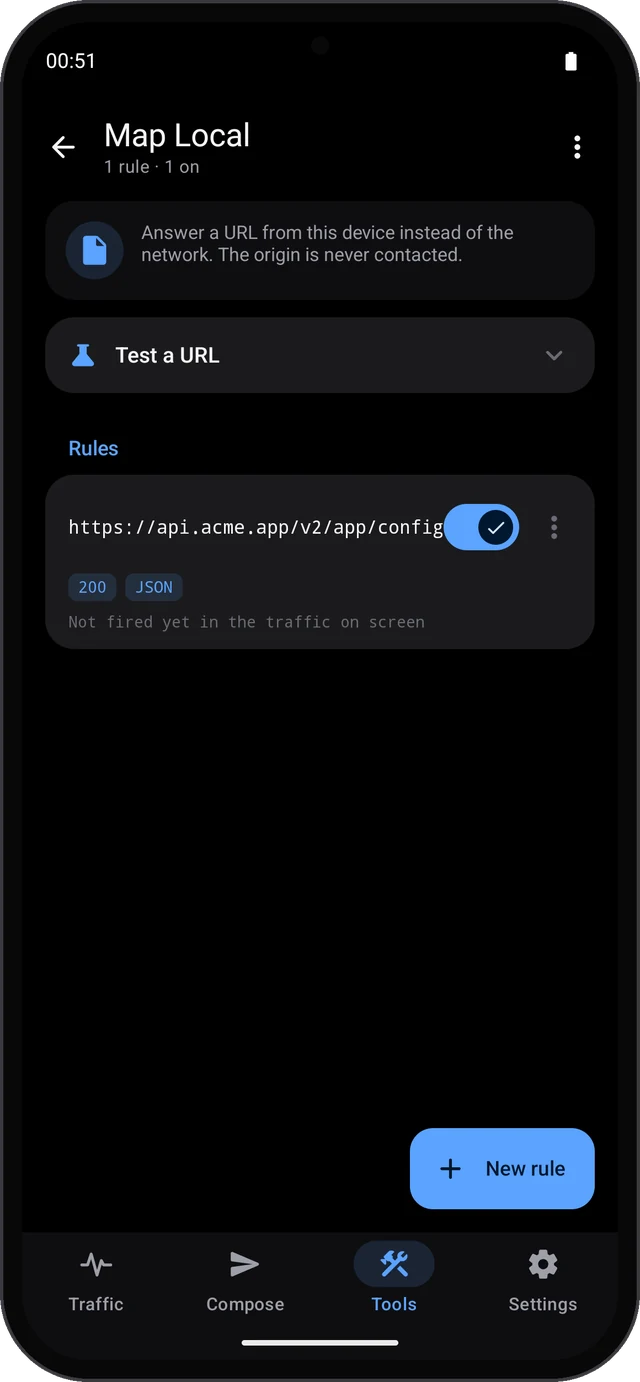
Tools ▸ Map Local has Test a URL, which shows which rule would answer a URL you type, and your rules. Each row shows the status and body type, and how often the rule fired in the traffic on screen.
The editor has:
- Match: pick a captured request or type a URL pattern, then choose Methods.
- Answer with: the Status and the Body, with JSON, HTML, Text or Empty setting
Content-Typefor you. Use the captured response fills both, and the headers, from the newest captured response. - More: extra Headers, and Wait before answering for a delay.
Content-Lengthis set for you.
Map Local, Rewrite or Scripting?#
- Map Local replaces the whole response and skips the server.
- Rewrite changes part of a real response on its way through.
- Scripting decides in code, per request, and can answer locally too.
Free and Pro#
The free plan includes one Map Local rule on every platform. Pro removes the limit.
Command line and MCP#
The command line and the MCP server run on the Mac. wirelens ships inside the app and is not on your PATH until you link it once.
wirelens rules map-local \
--pattern 'https://The MCP tool is add_map_local. It also takes response headers, a content type, a delay and also_breakpoint. After adding a rule, send the request through the proxy (send_request or replay_flow) and look for the mapped flow with list_flows.
Something here is unclear, or wrong for your setup? Contact support or write to support@wirelens.app.